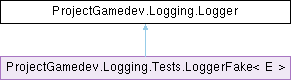
A lightweight thread-safe log utility for saving simple log messages to log files.
Each logger can only log to a single log file that is determined on object creation.
Multiple loggers can log to multiple files or to the same file - this class is thread-safe and optimised for working with multiple files.
More...
|
| class | LogBuffer |
| | The thread-safe static buffer that holds all logs messages from all loggers.
This buffer is responsible for storing the log messages in-memory and flushing them to their respective log files as needed. More...
|
|
| | Logger (string dirName, string fileName, bool deletePreviousLogs=false, int logsBeforeFlush=DEFAULT_LOGS_BEFORE_FLUSH) |
| | Creates a logger with a logfile located in Application.persistentDataPath (guarantees cross-OS functionality).
|
| | Logger (DirectoryInfo dirPath, string fileName, bool deletePreviousLogs=false, int logsBeforeFlush=DEFAULT_LOGS_BEFORE_FLUSH) |
| | Creates a logger with a logfile located in a custom, user-defined directory.
Multi-OS support is NOT guaranteed and is delegated to the caller of this constructor!
|
| void | Log (string text, string title, bool logToConsole=false) |
| | Combines text and title into a log message and time stamps it using DateTime.Now.
The created log message is then passed on to LogBuffer.Log(StringBuilder, string, int).
Thread-safe.
|
| void | Log (string text, bool logToConsole=false) |
| | Creates a log message from text and time stamps it using DateTime.Now.
The created log message is then passed on to LogBuffer.Log(StringBuilder, string, int).
Thread-safe.
|
| string | GetLogDirAbsPath () |
| | Returns the absolute path of the log files' directory. Thread-safe.
|
| bool | LogFileCreated () |
| | Checks if this logger's log file exists on disk. Thread-safe.
|
| DirectoryInfo | GetLogDirectory () |
| | Returns a DirectoryInfo object containing information about the logger's logs directory. Thread-safe.
|
| FileInfo | GetLogFile () |
| | Returns a FileInfo object containing information about the logger's log file. Thread-safe.
|
|
| static void | FlushAll () |
| | Forces all buffered log messages of all loggers to be written to the disk.
|
|
| string | CreateDirectory (string dir) |
| | Attempts to create the directory for this logger's log file.
If directory creation fails, LoggerDirectoryDoesNotExistException is thrown, and this logger object is rendered useless.
If the logs directory already exists, does nothing.
|
|
| string | filePath |
| | The absolute path to the log file (including its full name + file extension). Set during construction.
|
| string | logDirPath |
| | The absolute path to the log directory. Set during construction.
|
| string | logDirName |
| | The name (NOT path!) of the log directory. Set by the user.
|
| ILoggerIO | fileUtil |
| | A thread-safe file utility used by the Logger class for IO access.
|
|
| int | LogsBeforeFlush [get, set] |
| | Determines how many logs should be stored in memory before flushing to a log file.
This is done to avoid writing to a file (opening/appending/closing file) on each and every log, degrading performance.
Increase this value if logging is too detrimental to performance, or decrease it if some logs are not written to the log file (e.g. because of crashes).
|
|
| void | InitLogger (string dirName, string fileName, bool deletePreviousLogs) |
| | Common constructor functionality.
|
| void | Log (StringBuilder log, bool logToConsole) |
| | Common logging functionality.
|
|
| static string | FormatTime (DateTime time) |
| | Formats a log message timestamp and returns the result as a string.
|
| static string | Header (string time, string title) |
| | Combines and formats timestamp and title for a log message and returns the result.
|
| static string | Header (string time) |
| | Formats a timestamp for a log message and returns the result.
|
A lightweight thread-safe log utility for saving simple log messages to log files.
Each logger can only log to a single log file that is determined on object creation.
Multiple loggers can log to multiple files or to the same file - this class is thread-safe and optimised for working with multiple files.
◆ Logger() [1/2]
| ProjectGamedev.Logging.Logger.Logger |
( |
string | dirName, |
|
|
string | fileName, |
|
|
bool | deletePreviousLogs = false, |
|
|
int | logsBeforeFlush = DEFAULT_LOGS_BEFORE_FLUSH ) |
|
inline |
Creates a logger with a logfile located in Application.persistentDataPath (guarantees cross-OS functionality).
- Parameters
-
| dirName | The name (NOT path!) of the log directory. It will be created in Application.persistentDataPath to ensure multi-OS support. |
| fileName | The name (NOT path!) of the log file, excluding its file extension. The resulting log file will be [fileName ].log, and its full path will be [Application.persistentDataPath]/[dirName ]/[fileName ].log. |
| deletePreviousLogs | If set to true: If a file with this name already exists in dirName , and it is not currently assigned to another logger, it is overwritten.
Set to false to keep writing log messages to previous log files.
Default value: false. |
| logsBeforeFlush | Determines how many logs should be stored in memory before flushing to a log file.
This is done to avoid writing to a file (opening/appending/closing file) on each and every log, degrading performance.
Increase this value if logging is too detrimental to performance, or decrease it if some logs are not written to the log file (e.g. because of crashes). |
- Exceptions
-
◆ Logger() [2/2]
| ProjectGamedev.Logging.Logger.Logger |
( |
DirectoryInfo | dirPath, |
|
|
string | fileName, |
|
|
bool | deletePreviousLogs = false, |
|
|
int | logsBeforeFlush = DEFAULT_LOGS_BEFORE_FLUSH ) |
|
inline |
Creates a logger with a logfile located in a custom, user-defined directory.
Multi-OS support is NOT guaranteed and is delegated to the caller of this constructor!
- Parameters
-
| dirPath | The relative or absolute path of the log directory. |
| fileName | The name (NOT path!) of the log file, excluding its file extension. The resulting log file will be [fileName ].log, and its full path will be [dirPath ]/[fileName ].log. |
| deletePreviousLogs | If set to true: If a file with this name already exists in dirPath , and it is not currently assigned to another logger, it is overwritten.
Set to false to keep writing log messages to previous log files.
Default value: false. |
| logsBeforeFlush | Determines how many logs should be stored in memory before flushing to a log file.
This is done to avoid writing to a file (opening/appending/closing file) on each and every log, degrading performance.
Increase this value if logging is too detrimental to performance, or decrease it if some logs are not written to the log file (e.g. because of crashes). |
- Exceptions
-
◆ CreateDirectory()
| string ProjectGamedev.Logging.Logger.CreateDirectory |
( |
string | dir | ) |
|
|
inlineprotected |
Attempts to create the directory for this logger's log file.
If directory creation fails, LoggerDirectoryDoesNotExistException is thrown, and this logger object is rendered useless.
If the logs directory already exists, does nothing.
- Parameters
-
| dir | The absolute path of this logger's logs directory. Must have read and write access. |
- Returns
- The full name (i.e. absolute path) of the logs directory.
- Exceptions
-
◆ FlushAll()
| void ProjectGamedev.Logging.Logger.FlushAll |
( |
| ) |
|
|
inlinestatic |
Forces all buffered log messages of all loggers to be written to the disk.
◆ FormatTime()
| string ProjectGamedev.Logging.Logger.FormatTime |
( |
DateTime | time | ) |
|
|
inlinestaticprivate |
Formats a log message timestamp and returns the result as a string.
- Parameters
-
| time | Timestamp for the log message. |
◆ GetLogDirAbsPath()
| string ProjectGamedev.Logging.Logger.GetLogDirAbsPath |
( |
| ) |
|
|
inline |
Returns the absolute path of the log files' directory. Thread-safe.
◆ GetLogDirectory()
| DirectoryInfo ProjectGamedev.Logging.Logger.GetLogDirectory |
( |
| ) |
|
|
inline |
Returns a DirectoryInfo object containing information about the logger's logs directory. Thread-safe.
- Exceptions
-
| ArgumentNullException | |
| SecurityException | |
| ArgumentException | |
| PathTooLongException | |
◆ GetLogFile()
| FileInfo ProjectGamedev.Logging.Logger.GetLogFile |
( |
| ) |
|
|
inline |
Returns a FileInfo object containing information about the logger's log file. Thread-safe.
- Exceptions
-
| ArgumentNullException | |
| SecurityException | |
| ArgumentException | |
| UnauthorizedAccessException | |
| PathTooLongException | |
| NotSupportedException | |
◆ Header() [1/2]
| string ProjectGamedev.Logging.Logger.Header |
( |
string | time | ) |
|
|
inlinestaticprivate |
Formats a timestamp for a log message and returns the result.
- Parameters
-
| time | Timestamp string that will be shown with this log message. |
◆ Header() [2/2]
| string ProjectGamedev.Logging.Logger.Header |
( |
string | time, |
|
|
string | title ) |
|
inlinestaticprivate |
Combines and formats timestamp and title for a log message and returns the result.
- Parameters
-
| time | Timestamp string that will be shown with this log message. |
| title | Title of the log message. |
◆ InitLogger()
| void ProjectGamedev.Logging.Logger.InitLogger |
( |
string | dirName, |
|
|
string | fileName, |
|
|
bool | deletePreviousLogs ) |
|
inlineprivate |
Common constructor functionality.
◆ Log() [1/3]
| void ProjectGamedev.Logging.Logger.Log |
( |
string | text, |
|
|
bool | logToConsole = false ) |
|
inline |
Creates a log message from text and time stamps it using DateTime.Now.
The created log message is then passed on to LogBuffer.Log(StringBuilder, string, int).
Thread-safe.
- Parameters
-
| text | The contents of the log message. |
| logToConsole | Optional parameter: determines if the log is also written to the Unity Debug console.
Default value is false.
Be mindful of the performance implications of enabling this option when using many loggers. |
◆ Log() [2/3]
| void ProjectGamedev.Logging.Logger.Log |
( |
string | text, |
|
|
string | title, |
|
|
bool | logToConsole = false ) |
|
inline |
Combines text and title into a log message and time stamps it using DateTime.Now.
The created log message is then passed on to LogBuffer.Log(StringBuilder, string, int).
Thread-safe.
- Parameters
-
| text | The contents of the log message. |
| title | The title of the log message. |
| logToConsole | Optional parameter: determines if the log is also written to the Unity Debug console.
Default value is false.
Be mindful of the performance implications of enabling this option when using many loggers. |
◆ Log() [3/3]
| void ProjectGamedev.Logging.Logger.Log |
( |
StringBuilder | log, |
|
|
bool | logToConsole ) |
|
inlineprivate |
Common logging functionality.
◆ LogFileCreated()
| bool ProjectGamedev.Logging.Logger.LogFileCreated |
( |
| ) |
|
|
inline |
Checks if this logger's log file exists on disk. Thread-safe.
◆ DEFAULT_LOGS_BEFORE_FLUSH
| const int ProjectGamedev.Logging.Logger.DEFAULT_LOGS_BEFORE_FLUSH = 5 |
|
staticprivate |
Default value for buffered logs before flushing.
This value can be overwritten by the user when creating a Logger object.
See LogsBeforeFlush for more information.
◆ filePath
| string ProjectGamedev.Logging.Logger.filePath |
|
protected |
The absolute path to the log file (including its full name + file extension). Set during construction.
◆ fileUtil
| ILoggerIO ProjectGamedev.Logging.Logger.fileUtil |
|
protected |
A thread-safe file utility used by the Logger class for IO access.
◆ logBuffer
| readonly LogBuffer ProjectGamedev.Logging.Logger.logBuffer = new() |
|
staticprotected |
The thread-safe static buffer that holds all logs messages from all loggers.
This buffer is responsible for storing the log messages in-memory and flushing them to their respective log files as needed.
◆ logDirName
| string ProjectGamedev.Logging.Logger.logDirName |
|
protected |
The name (NOT path!) of the log directory. Set by the user.
◆ logDirPath
| string ProjectGamedev.Logging.Logger.logDirPath |
|
protected |
The absolute path to the log directory. Set during construction.
◆ LogsBeforeFlush
| int ProjectGamedev.Logging.Logger.LogsBeforeFlush |
|
getset |
Determines how many logs should be stored in memory before flushing to a log file.
This is done to avoid writing to a file (opening/appending/closing file) on each and every log, degrading performance.
Increase this value if logging is too detrimental to performance, or decrease it if some logs are not written to the log file (e.g. because of crashes).
The documentation for this class was generated from the following file:
- Assets/Project GAMEDEV/Tools/Logger/Scripts/Logger.cs
 1.14.0